

Avando AVE Pro mit Design Studio
- 30 days money back guarantee
Do you have questions?
Here you can contact the theme vendor.
Avando AVE Pro – One theme. Any look. In minutes.
Colours, fonts, spacing, corners, header and cards: you set them live in the frontend, on the real page, without a single line of CSS. Underneath there is no bloated framework, no div soup and no third-party module waiting to break with the next Contao update.
- For Contao 5.7 LTS and Contao 6
- Design Studio included: design live in the frontend
- Web standards of the latest generation: lightweight and fast
- No third-party modules, no CDN, no tracking
- Commercial licence, one-off per domain, client projects included
- No footer notice
Avando AVE Website | Documentation
What makes AVE different
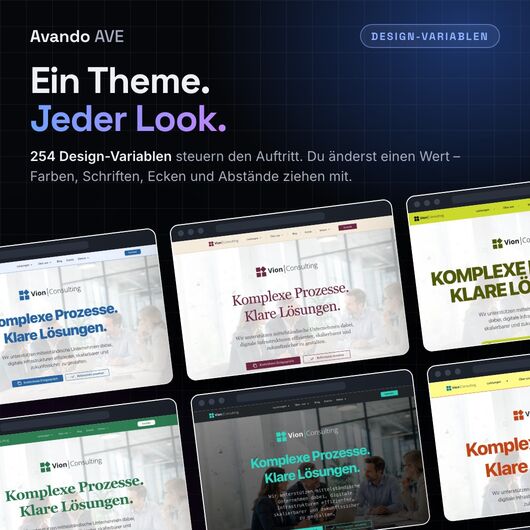
Most themes ship one look, and every client after that means overriding templates, writing CSS and maintaining layout sets. AVE turns this around. The name says it all: Advanced Variable Environment. The entire look depends on 254 named design variables. Change one value and everything that refers to it follows.
In other words: one theme for all your clients. The same installation, the same content, the same templates, and still every website looks tailor-made. In the end, a client design is a short, readable block of variables that you can download, version and take to your next project.
Highlights
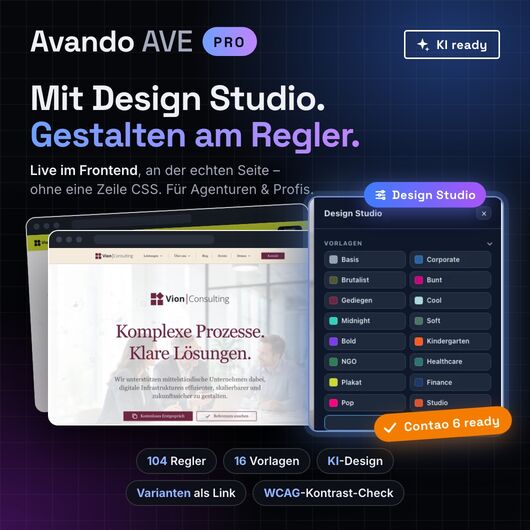
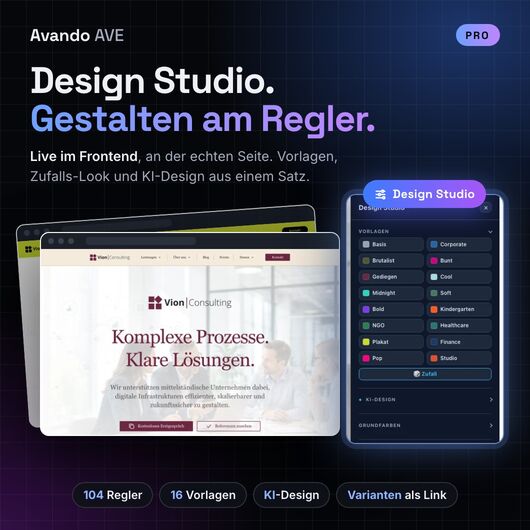
- ✔ Design Studio in the frontend: over 100 controls in nine groups, live on the real page
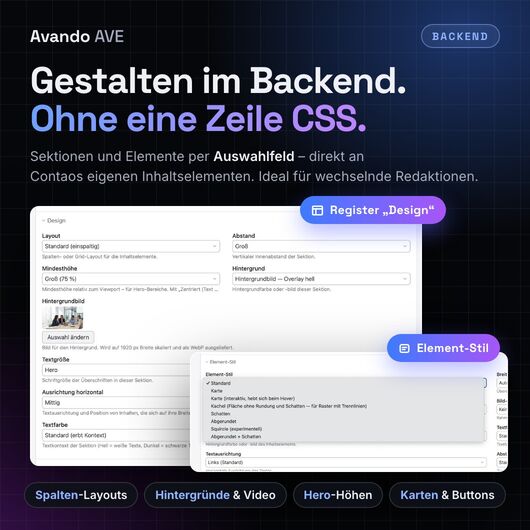
- ✔ Design fields instead of CSS classes: editors style sections and elements with select fields
- ✔ 16 presets as a starting point, from Corporate and Refined to Midnight and Poster
- ✔ Random look: one click rolls a completely new design to start with and tweak
- ✔ AI design from a single sentence: “Carpenter's workshop, down-to-earth, warm wood” becomes a complete look, using your own API key
- ✔ Variants as links: send your client three design directions as three URLs, with real content, no login and no staging clone
- ✔ Versions, undo and export: ⌘Z for the whole design, every state can be named and exported as a file
- ✔ 56 variable fonts, hosted locally automatically on save, no Google Fonts requests
- ✔ Simply add "AI generated image" to any picture with one click
- ✔ WCAG AA contrast check right in the Studio
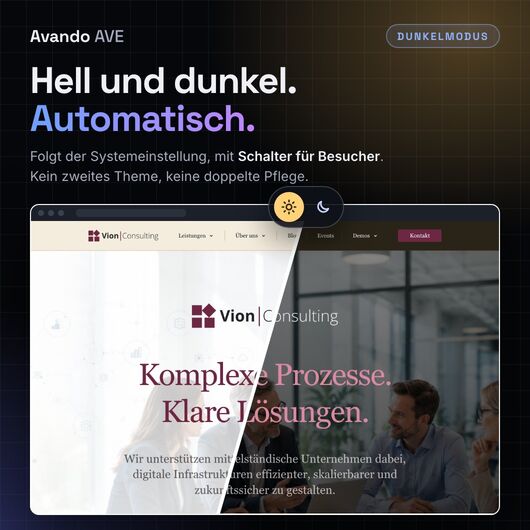
- ✔ Automatic dark mode, no second theme needed
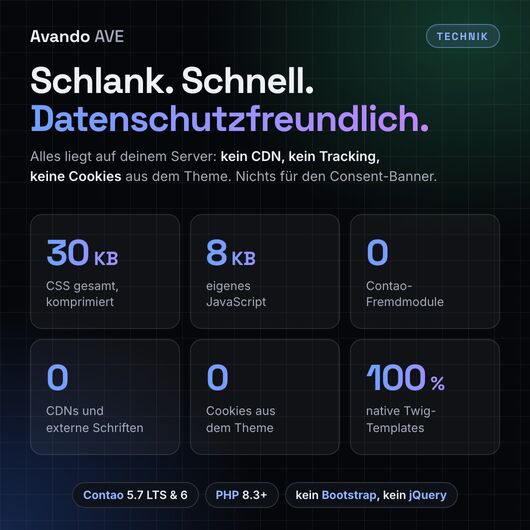
- ✔ 30 KB of CSS in total (gzip), 8 KB of own JavaScript
- ✔ 0 third-party modules, 0 CDNs, 0 build steps in day-to-day work
- ✔ AI-ready out of the box: a cheat sheet and build rules that Claude, Cursor & co. understand
Avando AVE Website | Documentation
The Design Studio: design with sliders
As a logged-in administrator, click Design Studio in the bottom right corner. A panel slides in while the client's site stays visible and usable next to it. Every change takes effect immediately and only goes live when you save.
- Base colours: set the primary colour, and the secondary colour, hover tones, muted text and dark mode are calculated automatically (via
oklch()andcolor-mix()) - Text and headings: font family, sizes, weight and letter spacing
- Layout & proportions: corner radius, density and width as scales. One number moves the whole ramp.
- Header & navigation: transparent, solid, inverted or custom colours; scroll behaviour, glass effect, height, navigation font and dropdowns down to the last detail
- Buttons, forms, cards, footer: ten ready-made footer surfaces, card borders, shadows
- Effects: shadow depth, glass blur, image filters (greyscale, sepia, faded …), transitions
- Contrast adjustment: the brand colour is lightened or darkened as text just enough to stay readable. As a surface it stays exactly the client's hex code.
- Preview for dark mode and mobile
- Versions: save, pin, restore, share as a link, download and import
Design reviews without staging or screenshot PDFs
Every version has its own URL. Your client opens it and sees their complete website in that variant, on every page and with real content. Nothing changes on the live site. The workflow: design → save as version → send link → approval → apply. Rejected directions are kept in case the client changes their mind.
AI design: optional and with your own key
Choose Anthropic, OpenAI, Google Gemini, Mistral, Groq, OpenRouter or your own OpenAI-compatible endpoint. Without a stored key the feature is invisible and not a single byte leaves your server. The server only accepts known controls with valid values. The result is first a preview, then a version, and only goes live when you save.
Avando AVE Website | Documentation
For editors: design fields instead of class names
Pages are still built from ordinary Contao content elements. AVE adds design fields to them. Nothing to memorise, nothing that can break.
Sections: Articles, element groups, news and events get a “Design” panel with these fields:
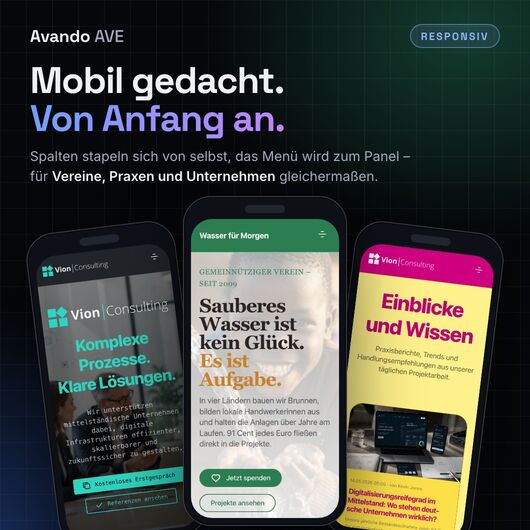
- Column layout: two, three, four or six columns, asymmetric 2:1 and 1:2, auto grid, text + image, content + sidebar; stacks automatically on mobile
- Backgrounds: surfaces, brand colours, image with five overlays, background video, gradients (including animated), frosted glass
- Hero heights: a third up to the full screen height, with vertical alignment
- Text colour, text scale, spacing, column gap, dividers
- Background images are resized automatically and delivered as WebP, including smaller variants for phones and tablets
Content elements: Every element gets an “Element Style” panel with these fields:
- Frames: card, interactive card, tile, shadow, rounded, squircle, media card with full-bleed image
- Buttons from the hyperlink element: primary, secondary, neutral, outline, ghost, soft, dark, glass; large, small, pill; with 60 SVG icons
- Image shapes: rounded, squircle, circle, blob, plus coloured image borders and ready-made image sizes for every grid
- Headlines: visual size independent of their level, letter spacing
- Width across several columns, custom backgrounds, alignment, bottom spacing
- Logo tint: the logo takes on the colours of its surroundings and stays visible on a coloured header and in dark mode.
Clear separation of roles: every editor can work on sections and elements. Only administrators see the Design Studio.
Ready-made building blocks
- One-page navigation as a dedicated module, generated automatically from the page's articles
- Background video with poster image and automatic pause button
- Blog & events: card and list views for news and events, “upcoming events”
- Accordion styles, sliders with controls on top of the slides, description lists
- Lightbox, loaded only on pages that contain a gallery
- 136 utility classes for everything beyond that
Privacy & accessibility: the technical side is taken care of
- All fonts local: when you pick a font in the Studio, it is downloaded once on save and served from your own server.
- No CDN, no tracking, no cookies from the theme. Nothing that needs a consent banner.
- Contrast check in the Design Studio: measures the visible text with the colours actually rendered, according to WCAG AA, marks the findings right on the page and sorts them by severity. A strong aid for your own review, not proof of conformance.
- Reduced motion is respected: animations are switched off and videos show their poster image.
- Focus outlines and dark mode come from the framework.
Avando AVE Website | Documentation
Technology that will still be maintainable in five years
- Contao 5.7 LTS and 6, PHP 8.3+, 100 % native Twig, no legacy
.html5templates - No Bootstrap, no Tailwind, no jQuery. The only library underneath is Open Props (7.5 KB): named values, not a single component class.
- No third-party Contao modules: AVE styles Contao's own content elements. No additional packages required; Contao already ships the three dependencies.
- CSS cascade with
@layer: yourcustom.cssalways wins, without!importantand regardless of specificity. - Update-safe: the framework lives in the bundle, your customisations separately from it.
- No build step in day-to-day work: native CSS custom properties, no Sass, no bundler
- Modern web standards:
light-dark(),oklch(),color-mix(),<details>,<dialog> - No lock-in to the Studio: every design state is a readable block of CSS variables. You can also edit it by hand at any time.
The theme every AI agent will love
AVE is built on web standards and named variables, exactly the language an AI speaks fluently. Included are a cheat sheet listing every token and class and AI instructions with the build rules. Claude Code, Cursor or Copilot find a finite, documented scope of action instead of an empty file. Five lines of :root { … } are enough for a complete look, and every change remains a reviewable diff.
Who is AVE for?
For agencies and freelancers: build the foundation once, not per client. Design reviews run via links instead of staging copies. Your clients stay on an established, update-safe CMS, and your team still works with AI tools, without lock-in.
For designers: design with sliders, live on the real page. No CSS, no ticket, no waiting for a deploy. The derived values keep the look coherent.
For developers: a documented set of --av-* tokens, a clean cascade and every design state as a text file, so it can be diffed and versioned.
For editors and clients: select fields instead of class names, and drafts as links instead of imagination.
Avando AVE Website | Documentation
Licence
- One licence per domain, paid once and valid indefinitely. Subdomains are included:
example.com,www.example.comandshop.example.comcount as one domain. - For any purpose, including commercial. Agencies set up AVE on behalf of their clients; one licence per client domain is required.
- Local development, test and staging need no licence of their own as long as they are not public.
- No footer notice: the Pro token from your delivery hides it. You enter it in the backend, and the setting survives every update.
- Moving is allowed: the licence may be transferred to a new domain once.
- You may modify the source code. The full licence terms are included in the package.
Already using AVE Free? Then you can switch without starting over. Buy a Pro licence, enter the Pro token in the backend and install the Design Studio; you receive the package with your licence. Pages, content and design fields are kept. Tip: values you previously set by hand in custom.css take precedence over the Studio. Remove them if you want to adjust them with the sliders from now on.
For clubs, parishes and private sites there is Avando AVE Free: the theme without the Design Studio, free for non-commercial websites.
Avando AVE: design as a setting, not a rebuild.
Theme details
Vendor AvandoLabs (show all themes)
Contao versions
- 6.0
- 5.7
Browser compatibility Chrome ab 123, Firefox ab 128, Safari ab 17.5, Edge
Date added October 10, 2026
License terms
The following license terms apply to the theme:
This English version is a translation provided for information only. The German version is legally binding.
Avando AVE Pro consists of the theme (commercial licence under Route A) and the Design Studio. The following licence terms apply to both.
Avando AVE — Licence terms
Version 1.0 · As of 1 September 2026
Licensor: Dipl.-Ing. (FH) Ulrich Braun (Avando Labs) (hereinafter “Licensor”), address for service in the legal notice at avando-labs.de/impressum
Contact: themes@avando-labs.de · avando-labs.de
Summary (not part of the contract, just a reading aid — in case of doubt the text of the sections prevails): There are two ways to use this theme. Whoever pays runs it on one domain and needs no attribution. Whoever doesn't pay may use it on any number of websites — but only if the website is non-commercial, nobody is paid for building it and the attribution stays in the footer.
§ 1 Subject matter
(1) The subject matter of this licence is the Contao theme Avando AVE (Composer package avando/ave) including all stylesheets, templates, PHP classes, configuration files, icons and documentation contained therein (hereinafter “the Software”).
(2) The Design Studio (avando/ave-editor) is not covered by this licence. This add-on package is governed by its own licence, which accompanies it (see § 8).
(3) The Software is licensed, not sold. All rights not expressly granted here remain with the Licensor.
§ 2 The two ways of use at a glance
| Route A — Commercial licence | Route B — Free licence | |
|---|---|---|
| Cost | one-off per domain | none |
| Number of websites | one domain per licence | unlimited |
| Purpose of the website | any, including commercial | non-commercial only |
| Paid creation of the website | allowed | not allowed |
| Attribution in the page footer | not required | required |
| Modifying the source code | yes | yes |
| Passing on to third parties | no | no |
Exactly one of the two routes must be chosen for each individual website. Anyone who does not (or no longer) meets the requirements of Route B needs a licence under Route A for that website.
§ 3 Route A — Commercial licence
(1) By purchasing a commercial licence, the Licensee obtains the simple (non-exclusive), perpetual, non-transferable right to operate the Software publicly on one (1) domain — for any purpose, including a commercial one.
(2) A domain within the meaning of this licence is a registered domain name including all of its subdomains. example.com, www.example.com and shop.example.com are therefore one domain and require one licence. A different second-level domain — including a different country extension of the same name (example.de) — is a further domain and requires a further licence.
(3) Non-public installations of the same website are not counted: local development environments, test and staging instances as well as backups, provided they are not accessible to the public or indexed by search engines.
(4) The licence is tied to the domain, not to a person. It may be transferred once to another domain if the website moves and the old domain no longer runs the Software. Selling or leasing the licence to third parties is excluded.
(5) Agencies and service providers may set up and customise the Software on behalf of their clients. A licence is required per client domain.
§ 4 Route B — Free licence for non-commercial websites
(1) The Software may be used free of charge and on any number of domains if all of the following conditions are met:
- The website is non-commercial within the meaning of paragraph 2.
- Nobody receives remuneration within the meaning of paragraph 3 for the conception, design, setup, customisation, content entry, training or maintenance of this website.
- The attribution according to § 5 is present on the website and remains permanently visible.
(2) A website is non-commercial if it serves neither directly nor indirectly to make a profit. This includes in particular websites of registered associations, parishes, schools, nurseries, foundations, citizens' initiatives, self-help groups and volunteer projects, as well as purely private websites. A call for donations, a membership fee, an association magazine or a small sale within the scope of the association's purpose does no harm, as long as the operation of the website itself is not aimed at profit.
The following in particular are not non-commercial: websites of companies and freelancers, online shops, booking and rental sites, advertising-financed offerings, affiliate sites and websites that advertise a paid offering.
(3) Remuneration is any consideration with monetary value — fee, hourly wage, flat rate, payment in kind, offsetting or barter. As soon as anyone is paid for building or running the website, Route B no longer applies, even if the website itself remains non-commercial. In this case a licence under § 3 must be purchased; who purchases it — service provider or client — is left to the parties involved.
Expressly not remuneration are: volunteer work, the reimbursement of documented expenses (hosting, domain, photo material) and the volunteer allowance under Section 3 No. 26a of the German Income Tax Act (EStG).
(4) The Licensor may revoke the free use for the future if the requirements cease to apply. Revocation is made in text form with a notice period of 30 days; within this period a licence under § 3 may be purchased.
§ 5 Attribution (Route B only)
(1) The Software outputs the notice itself. It appears at the end of every page and reads:
Built with the free Avando AVE theme for Contao
The notice is generated by the Software's page layout (bundle/contao/templates/twig/page/layout.html.twig, block .ave-credit) and styled by its stylesheet. There is nothing to add — there is only nothing to remove.
(2) Any measure that makes the notice invisible or illegible is prohibited, in particular:
- removing or commenting out the block in the template or in an overridden version of the template,
display:none,visibility:hidden, zero height or opacity, moving it out of the visible area, covering it with other elements,- reducing the font size or colour contrast below what the Software delivers,
- removing the link or redirecting it to another address,
- suppressing the notice via JavaScript after the page has loaded.
(3) Adjustments that do not impair legibility are permitted: a translation of the sentence into the language of the website, a surface or font adapted to the page design, a different position within the page footer.
(4) The link carries rel=“nofollow“. This is intentional and not an oversight: an attribution line that appears on thousands of websites at the same time is exactly the pattern search engines assess as a link scheme — the markup therefore protects both sides. It must not be removed.
(5) Anyone who has purchased a licence under § 3 may remove the notice, but does not have to. This is not done by changing the template, but via the Pro token included with the delivery. It is entered in the back end in the website root of the licensed domain (field “Pro token” in the section “Avando AVE”); alternatively in the configuration of the installation (avando_ave.license in config/config.yaml).
This way the decision survives every update, and it remains traceable when it was made. A modified template falls back at the next update; a page layout overridden in the project also freezes all future improvements to it.
(6) The Pro token is part of the licence and must be treated like an access key. Passing it on to third parties, publishing it or using it on a domain without its own licence under § 3 is a breach of § 7 and terminates the licence under § 13.
§ 6 Permitted on both routes
(1) Installing, operating and backing up the Software on own or rented infrastructure.
(2) Modifying the source code for one's own website: own stylesheets, overridden templates, changed tokens, added classes. The Licensor owes no support for customised installations, and updates may overwrite customisations.
(3) Making any number of backup copies.
(4) Passing it on to a commissioned service provider for the purpose of working on the licensed website. The service provider does not acquire any right of use of their own from this.
§ 7 Prohibited on both routes
(1) Passing on, publishing, selling, renting, lending or sublicensing the Software or parts of it to third parties — including in modified or renamed form or as part of one's own product, theme, template, website builder or template collection.
(2) Making the source code publicly available, for example in a public repository, a package registry or a download area.
(3) Use in an offering that makes the Software available to third parties as part of a website builder, site generator or multi-tenant system, unless a licence under § 3 exists for every domain operated in this way.
(4) Removing, altering or obscuring copyright, trademark or licence notices in the source code.
(5) Circumventing or defeating technical measures for licence verification.
(6) Using the Software or its components to train machine learning models that generate source code or designs.
§ 8 Design Studio (Pro add-on)
The Design Studio (avando/ave-editor) is a paid add-on and not part of Route B. The theme is fully functional without the Studio — all design values are available as CSS tokens in the stylesheets and can be overridden by hand. The Studio is governed by the licence in ave-editor/LICENSE.md.
§ 9 Third-party components
The Software contains and loads third-party components that are subject to their own licences. For the respective components, these licences take precedence over this licence. The overview is in THIRD-PARTY.md.
In particular: fonts are not included, but loaded from Google Fonts when needed and stored locally. They are subject to the SIL Open Font License or the Apache License; the licence file is stored next to the font file on download and must remain there.
Demo content (sample texts, sample images, sample PDFs under files/demo/) is not part of the licensed Software. It serves demonstration purposes and must not be taken over into a published website.
§ 10 Updates and support
(1) There is no entitlement to updates, new features or support unless expressly agreed otherwise.
(2) If updates are provided, these licence terms apply to them in the version enclosed in each case.
§ 11 Warranty
(1) The Software is provided in its respective state. The Licensor does not warrant that it is fit for a particular purpose, uninterrupted or free of errors.
(2) For Route B (provision free of charge), the Licensor is liable for material defects and defects of title only in the case of fraudulent concealment.
(3) The Licensee remains responsible for the lawful operation of their website — in particular for the legal notice, privacy policy, consents, accessibility and image rights. Notes in the Software or its documentation on these topics are assistance, not legal advice and not a warranted characteristic.
§ 12 Liability
(1) The Licensor is liable without limitation for intent and gross negligence, for injury to life, body or health and under the German Product Liability Act.
(2) In the event of a slightly negligent breach of an essential contractual obligation, liability is limited to the foreseeable damage typical of the contract, at most to the licence fee paid for the domain concerned. Otherwise liability is excluded.
(3) The Licensee backs up their data themselves. The Licensor is liable for the loss of data only to the extent that would have arisen had the data been backed up properly.
§ 13 Term and termination
(1) The licence is valid for an unlimited period.
(2) It terminates automatically in the event of a breach of § 5 or § 7. The Software must then be removed from all affected systems.
(3) A breach that is fully remedied within 14 days of a request in text form leaves the licence unaffected. This option exists once.
§ 14 Changes to this licence
The Licensor may issue future versions of this licence. For a licence already purchased, the version enclosed at the time of purchase applies.
§ 15 Final provisions
(1) The law of the Federal Republic of Germany applies, excluding the UN Convention on Contracts for the International Sale of Goods (CISG).
(2) The place of jurisdiction is Hainichen, provided the Licensee is a merchant, a legal entity under public law or a special fund under public law.
(3) Should a provision be invalid, the validity of the remaining provisions shall not be affected. The invalid provision shall be replaced by what comes closest to its economic purpose.
(4) Amendments and additions require text form.
Contact
Questions about the licence, ordering a commercial licence, enquiries about multiple or agency licences: themes@avando-labs.de
Avando AVE Design Studio — Licence terms
Version 1.0 · As of 1 September 2026
Licensor: Dipl.-Ing. (FH) Ulrich Braun (Avando Labs) (hereinafter “Licensor”), address for service in the legal notice at avando-labs.de/impressum
Contact: themes@avando-labs.de · avando-labs.de
§ 1 Subject matter
(1) The subject matter of this licence is the Avando AVE Design Studio (Composer package avando/ave-editor) including all PHP classes, JavaScript files, stylesheets, translations and documentation contained therein (hereinafter “the Studio”).
(2) The Studio is a paid add-on to the theme Avando AVE (avando/ave). It requires a valid licence of the theme.
(3) The Studio is licensed, not sold.
§ 2 Right of use
(1) By purchasing a licence, the Licensee obtains the simple (non-exclusive), perpetual, non-transferable right to operate the Studio on one (1) domain.
(2) For the definition of the domain, for non-public test and development instances and for the one-time transfer to another domain, § 3 paragraphs 2 to 4 of the theme licence (../bundle/LICENSE.md) apply accordingly.
(3) There is no free licence for non-commercial websites for the Studio. Anyone using the theme under Route B of the theme licence may not install the Studio. The theme can be fully designed without the Studio: all values are available as CSS tokens in bundle/public/theme/tokens.css and can be overridden in files/theme/CSS/custom.css.
§ 3 Prohibited
§ 7 of the theme licence applies accordingly. Additionally prohibited is:
(1) Rebuilding the Studio or its user interface as a product of one's own on the basis of its source code.
(2) Operating the Studio as a service for third parties (for example as a design tool in a website builder), unless a licence exists for every domain served in this way.
§ 4 Keys for language models (BYOK)
(1) The Studio can translate descriptions into design suggestions. For this, the Licensee stores their own access key to a language model service (“bring your own key”). The Licensor provides no key and no quota.
(2) The Licensee bears the costs of and the responsibility for using this service, including compliance with its terms and the data protection assessment. The data transmitted to the service leaves the Licensee's installation; the Licensor does not receive it.
(3) The key is stored encrypted in the Contao configuration. The Licensee is responsible for ensuring that this file does not end up in a version control system or a backup accessible to third parties.
§ 5 Warranty, liability, term, final provisions
Sections 10 to 15 of the theme licence (../bundle/LICENSE.md) apply accordingly.